
Install the built-in print driver over a wireless or wired (Ethernet) network connection on a computer with Windows 7 or Windows Vista.
- Search Windows for devices, and then click Devices and Printers in the list of results.
- Click Add a printer.Figure : Clicking Add a printer

- Select Add a network, wireless or Bluetooth printer.A Select a printer windows displays.Figure : Example of a printer found in Select a printer window
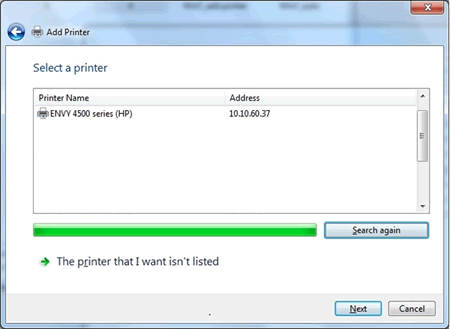
- If your printer is in the list, select it, click Next, and then follow the on-screen instructions to install the driver. You can now use your printer.
- If your printer is not in the list, click the back arrow in the upper left corner of the window to return to the What type of printer do you want to install? step, and then continue to the next step.
- Click Add a local printer.
- Select Use an existing port (LPT1: Printer Port), and then click Next.
- Click Windows Update, and then wait for the print drivers to update.
- Click HP, Hewlett-Packard, or Hewlett Packard in the Manufacturer pane, and then click the name of your printer in the Printers pane.
- If your printer is in the list, select it, click Next, and then follow the on-screen instructions to install the driver. You can now use your printer.
- If your printer is not in the list, click the back arrow in the upper left corner of the window two times to return to the What type of printer do you want to install? step, and then continue to the next step.
- Click Add a network, wireless or Bluetooth printer window, and then click The printer that I want isn't listed.
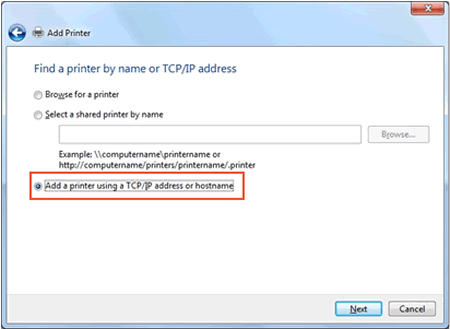
- Select Add a printer using TCP/IP address or hostname, and then click Next.Figure : Selecting Add a printer using TCP/IP address or hostname
- Select Autodetect from the Device type drop-down list.Figure : Selecting Autodetect

- Type your printer IP address into the text box, and then click Next.You can find the IP address by printing either a Wireless Network Test report or a Network Configuration page. For printers with displays, the IP address displays on the printer control panel through the wireless
 icon or button.
 - Wait for the computer to connect to the printer, and then click Next to install the print driver.

No comments:
Post a Comment